The Ozempic Tracker App That Keeps Your Routine Organized
Staying organized on a once-weekly medication should feel simple. GLP-1 Tracker gives you a warm, clear place to log your Ozempic doses, your meals, and your progress, with a friendly otter named Otis cheering you on along the way.
The short answer
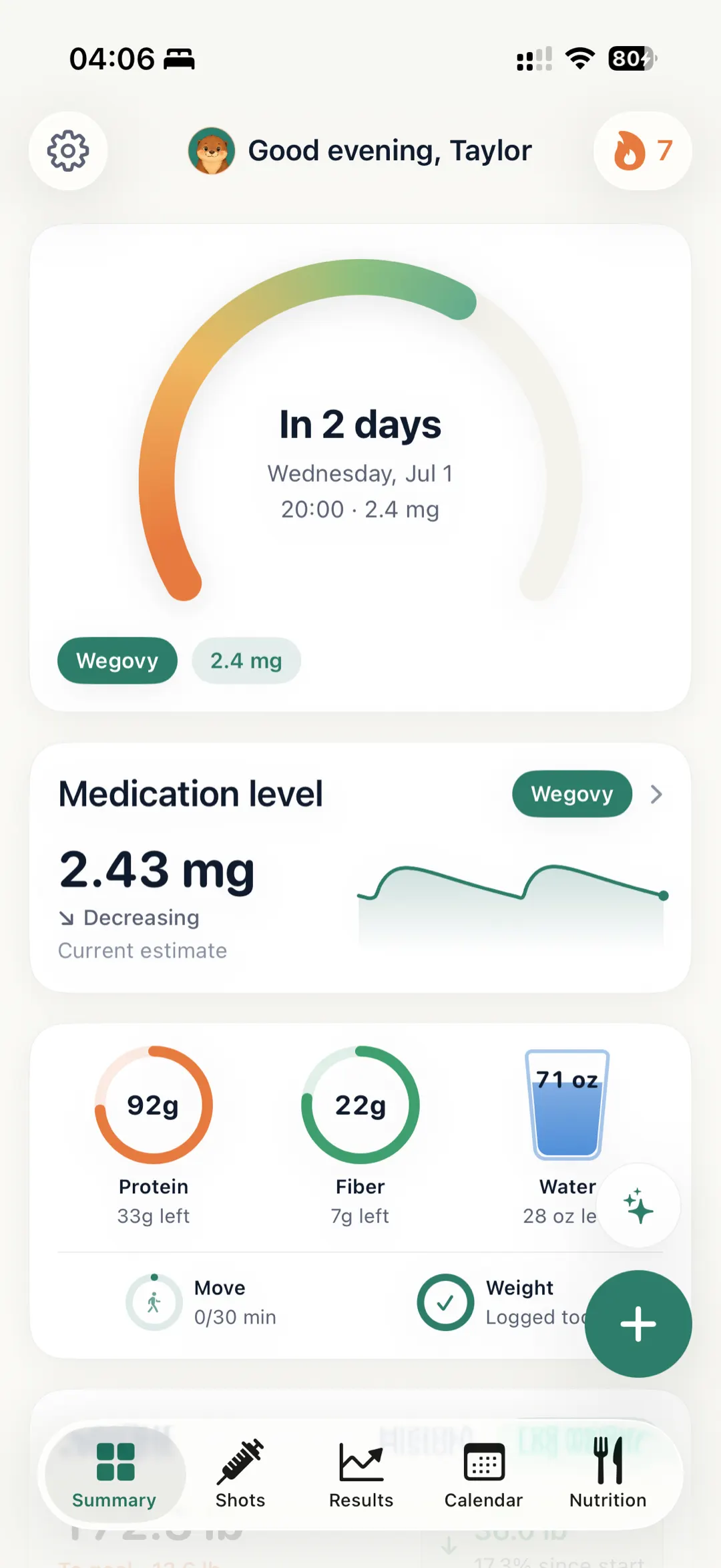
An Ozempic tracker app is a place to record each weekly semaglutide injection — the date, the dose your prescriber set, and the site you used — alongside weight, meals, and how you felt. GLP-1 Tracker does this on iOS, adding reminders, injection-site rotation history, and an educational medication-level view. It organizes what you enter; it never advises on dosing, which stays with your prescriber.
Key takeaways
- GLP-1 Tracker is an independent iOS app for organizing an Ozempic (semaglutide) routine, built around the once-weekly cadence so dose days are easier to keep in view.
- Every dose can be logged with its date and injection site, building a clear, scrollable history you can revisit or bring to a provider check-in.
- An optional educational 'medication-level' visual is offered for general context and curiosity only. It is an estimate, not a clinical measurement, and is never a basis for any treatment decision.
- Beyond doses, you can track weight, BMI, progress photos, and AI photo-based meal logging that highlights protein, with gentle reminders, streaks, and Otis the otter for friendly encouragement.
- It is not medical advice and is not affiliated with or endorsed by the makers of Ozempic. It also supports other commonly tracked GLP-1 medications and works in 11 languages.
Log every weekly dose
Record each Ozempic (semaglutide) injection with the date and the site you used, so your personal history is always a tap away when you want to look back or share it at a check-in.
Rotate injection sites with ease
Note where you injected each week and see your site history at a glance, making it easier to keep your own routine organized between appointments.
Gentle reminders and streaks
Set a reminder for your weekly cadence and build a streak that celebrates consistency, so a busy week is less likely to catch you off guard.
AI meal logging, protein-first
Snap a photo of your plate and let the app estimate calories, protein, and fiber, helping you stay mindful of nutrition while you keep protein front of mind.
Designed around the once-weekly rhythm
Ozempic (semaglutide) is commonly taken as a once-weekly injection, and a weekly cadence is easy to lose track of when life gets busy. GLP-1 Tracker is designed around that rhythm so your tracking can keep up with you.
Each time you log a dose, the app records the date and the injection site you chose, then builds a clear, scrollable history. When it's time for a check-in, your record is gathered in one place rather than scattered across notes and memory.
GLP-1 Tracker is an organizing tool, not a source of medical advice. Always follow the guidance of your healthcare provider for anything related to your dose or schedule.
An educational medication-level estimate
Many people on a weekly medication are simply curious about how their routine fits together over time. GLP-1 Tracker offers an educational "medication level" view, a rough approximation drawn from the dose history you log and the publicly known general half-life of the medication.
This view is for learning and curiosity only. It is an estimate, not a measurement of what is actually in your body, not a clinical reading, and not a diagnosis. It should never guide how you take your medication. For any decision about your treatment, your healthcare provider is the right person to ask.
More than doses: your whole picture in one place
Alongside dose logging, you can track weight, BMI, and progress photos so you can look back on your journey in your own terms and at your own pace.
The AI photo scan makes meal logging quick: take a picture and the app estimates calories, protein, and fiber, with protein highlighted first. Paired with reminders and a friendly streak, it adds up to a calm, encouraging companion rather than another chore.
GLP-1 Tracker also supports other commonly tracked GLP-1 medications and works in 11 languages, so your tracking can stay consistent in whichever language feels most comfortable to you.
Turn your history into an easy check-in recap
When you sit down with your healthcare provider, it helps to have the details in one place instead of trying to reconstruct the last few weeks from memory. Because GLP-1 Tracker keeps your logged dose dates, injection sites, weight and BMI trend, and meal notes together, you can open the app and scroll back through a tidy timeline rather than piecing things together on the spot.
The app organizes the information you choose to enter. It does not interpret your data, draw conclusions, or offer medical advice. What you do with that recap, and any questions it raises, is a conversation for you and your provider. Think of the app as the note-keeper that helps make those conversations a little smoother.
Jotting down how you feel, week to week
Many people like to keep a simple personal note of how a week went alongside their dose log, so they can look back and notice their own patterns over time. GLP-1 Tracker gives you a calm, private place to record those observations next to the rest of your routine, at your own pace and in your own words.
These notes are for your personal reference only. They are not a symptom checker, a diagnosis, or a substitute for professional care, and the app cannot assess what you are experiencing. Any mention of how someone might feel is general and is never an exhaustive list of possible side effects. If anything concerns you or feels unusual, please contact your healthcare provider or seek appropriate medical care.
Frequently asked questions
Is GLP-1 Tracker an Ozempic tracker app?
Yes. GLP-1 Tracker is an iOS app you can use to log your Ozempic (semaglutide) doses, injection sites, meals, weight, and reminders. It is a personal organizing tool to help you stay consistent, and it is not affiliated with, sponsored by, or endorsed by the makers of Ozempic.
Does the app tell me how much Ozempic to take?
No. GLP-1 Tracker does not provide dosing instructions or medical advice, and it will never tell you to start, stop, or change your medication. It simply records what you enter. For anything about your dose or schedule, talk with your healthcare provider.
What is the "medication level" view?
It is an educational estimate based on the dose history you log and the medication's general half-life, meant to help you picture how your weekly routine fits together. It is an approximation, not a clinical measurement, and should never be used to make treatment decisions. Always defer to your healthcare provider.
Can I track injection sites and weekly reminders?
Yes. You can note which injection site you used each week and view your site history, and you can set a reminder that fits a once-weekly cadence. A streak helps you celebrate staying consistent over time.
Does it work for other GLP-1 medications and languages?
It does. Beyond Ozempic, the app supports other commonly tracked GLP-1 medications, and it is available in 11 languages so you can keep tracking in whichever language you prefer.
How is my Ozempic tracking data handled?
Your logged information, including dose dates, injection sites, weight, photos, and notes, is your personal record within the app. It is meant to help you stay organized rather than to be shared on your behalf, and you decide what, if anything, you bring to a check-in. For specifics on storage and data practices, please see the app's privacy policy.
Can the app help if my weekly routine gets disrupted by travel or a busy week?
Yes. You can set a gentle reminder for your weekly cadence and log a dose with a single tap whenever you take it, so a packed schedule or a trip is less likely to throw off your record-keeping. The app simply records what you enter. It does not advise on timing, scheduling, or anything related to your dose, which is always a matter for you and your healthcare provider.
I have been tracking Ozempic in my notes app. Can I switch to GLP-1 Tracker?
You can start using GLP-1 Tracker whenever you like and begin logging from your next dose forward, and you can add earlier history manually if you want a fuller picture. From there, everything lives in one organized place, including the dose timeline, injection sites, weight and BMI, progress photos, and meal logs, instead of being scattered across separate notes.
Stay organized on your weekly routine
Download GLP-1 Tracker for iOS and let Otis help you keep your Ozempic doses, meals, and progress in one calm, encouraging place.
Reading on a desktop? Scan to open it on your iPhone.apps.apple.com/app/id6765520636
This page is for general education only and is not medical advice, diagnosis or treatment. GLP-1 Tracker is a tracking tool, not a medical device. Always consult your healthcare provider about your medication, dosing and health decisions. Brand names are trademarks of their respective owners and are not affiliated with this app.